
Web Niraj
  • Facebook
  • Flickr
  • Github
  • Instagram
  • Linkedin
  • Twitter
  • YouTube
Online portfolio, code examples and developer blog
  • About
  • Contact
  • Portfolio
  • WordPress
Search the site...
  • Home
  • Blog
  • Google+ API: Sharing An Interactive Post

Google+ API: Sharing An Interactive Post

2

The Google+ API allows you to create interactive posts you can share from your website, which contain a call-to-action button with an image and details from the link you want to share. The API lets you pre-fill the text the user can use to share your link (something which Facebook as removed from their API), and gives you options to add in deep-links for mobile apps too.
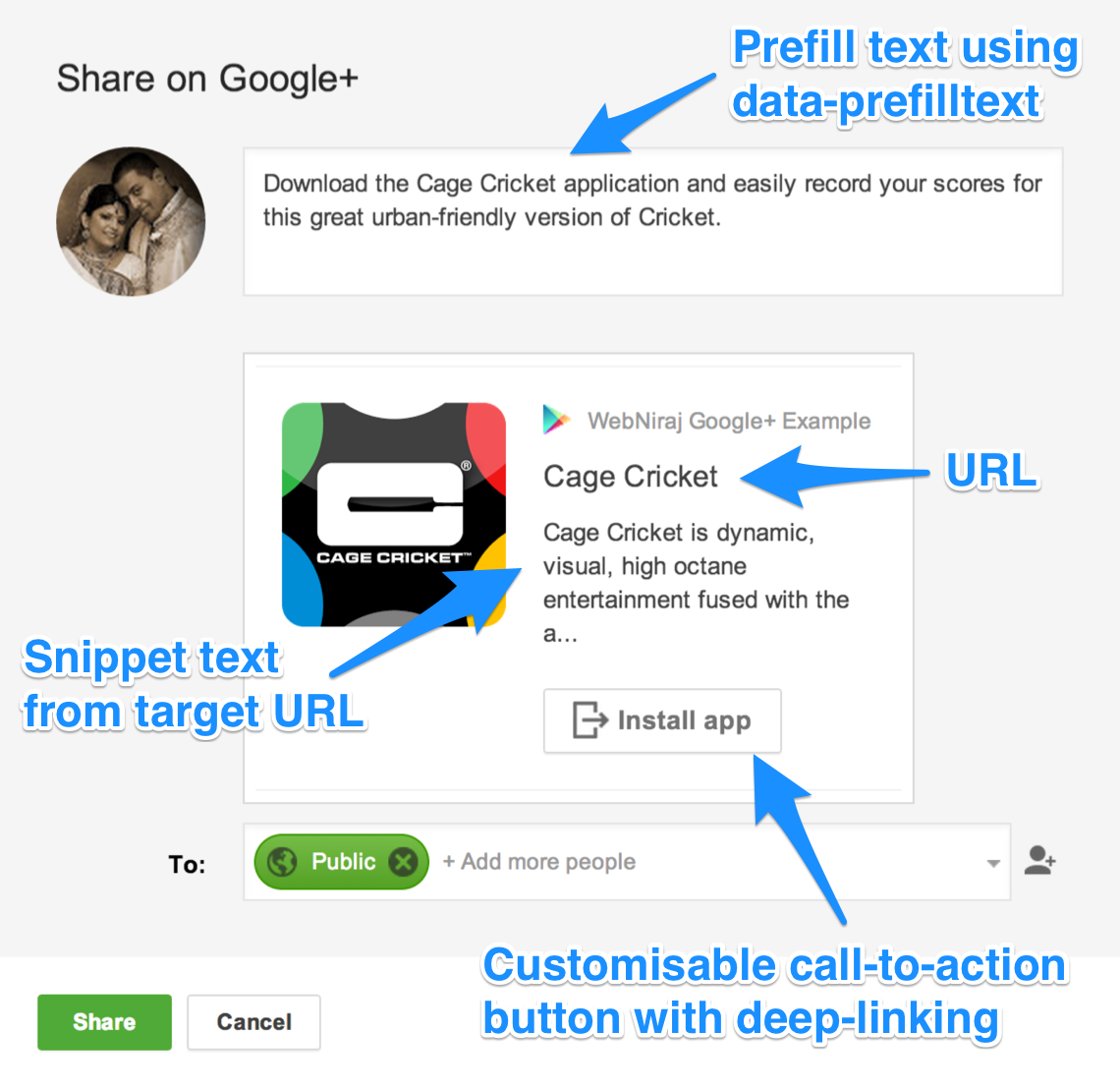
Google+ Interactive Share

The code below shows how easy it is to create a interactive share button, with a few lines of JavaScript and some HTML to render the button.

<div class="well">
<button
class="g-interactivepost btn btn-info"
data-contenturl="https://play.google.com/store/apps/details?id=com.cagecricket.app"
data-contentdeeplinkid=""
data-clientid="xxxxx.apps.googleusercontent.com"
data-cookiepolicy="single_host_origin"
data-prefilltext="Download the Cage Cricket application and easily record your scores for this great urban-friendly version of Cricket."
data-calltoactionlabel="INSTALL_APP"
data-calltoactionurl="https://play.google.com/store/apps/details?id=com.cagecricket.app"
data-calltoactiondeeplinkid="">
Tell your friends
</button>
</div>
<!-- Place this asynchronous JavaScript just before your </body> tag -->
<script type="text/javascript">
(function() {
var po = document.createElement('script'); po.type = 'text/javascript'; po.async = true;
po.src = 'https://apis.google.com/js/client:plusone.js';
var s = document.getElementsByTagName('script')[0]; s.parentNode.insertBefore(po, s);
})();
</script>
view raw google+_share.html hosted with ❤ by GitHub

You can customise the following attributes:

  • data-contenturl – the URL you want to share
  • data-contentdeeplinkid – the deep-link URL
  • data-clientid – Client ID from Google APIs Console
  • data-prefilltext – The text you want to pre-fill for the user
  • data-calltoactionlabel – label for your call-to-action button, see the full list here.
  • data-calltoactionurl – URL for the call-to-action button. The content URL and the call-to-action URL must match for the post to work.
  • data-calltoactiondeeplinkid – the deep-link URL for the call-to-action

It is currently not possible to track sharing of the interactive post, but it is possible using the standard Share button.

Google APIs, Google+, JavaScript

2 comments on “Google+ API: Sharing An Interactive Post”

  1. Ivan says:
    September 25, 2015 at 9:40 PM

    Hi,

    Is it possible to receive a callback after successful share?
    Thank you,
    Ivan.

    Reply
    • Niraj Shah says:
      September 30, 2015 at 9:52 AM

      No. Google+ does not send callback on share, only when pressing the button. So you cannot correctly determine if the user actually shared a post.

      Reply

Leave a Reply Cancel reply

This site uses Akismet to reduce spam. Learn how your comment data is processed.

StackExchange / StackOverflow

profile for Niraj Shah on Stack Exchange, a network of free, community-driven Q&A sites

Subscribe for updates

Support Me

Buy Me a Coffee

PSN Profile

Tags

ACL Amazon Web Services Android Android 4.4 KitKat Android 5.0 Lollipop Apache Backup Bug Command Line Cordova cPanel / WHM Facebook Facebook Graph API Facebook PHP SDK 4.0 Facebook Social Plugins Fan Page Flash Flat File Geolocation Google Nexus 5 Hacking HTML5 iOS JavaScript jQuery Laravel 5 Linux Mac OS MongoDB NodeJS Parse PDF PHP Plugin Portfolio PS4 Review Security Server SSH SSL Sysadmin Tutorial WordPress WordPress Plugins

© 2011-2026 Niraj Shah
  • Blog
  • Portfolio
  • WordPress
  • About Me
  • Contact Me
  • Privacy Policy