
As someone who uses Gemini and Antigravity for daily coding, monitoring my remaining quota was a constant hassle. To fix this, I developed a macOS titlebar app that keeps my usage stats continuously visible on my laptop. It is lightweight and allows you to view your quotas without needing to sign into your Google account.
Rather, the app communicates with the Gemini Daemon, which operates in the background while Antigravity IDE is active. This ensures you aren’t granting access to your Google Account (and Gemini account) to an unfamiliar app or developer.
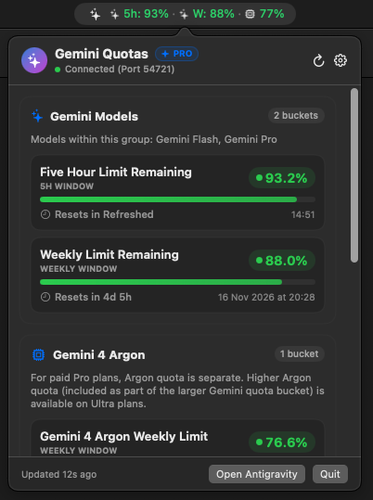
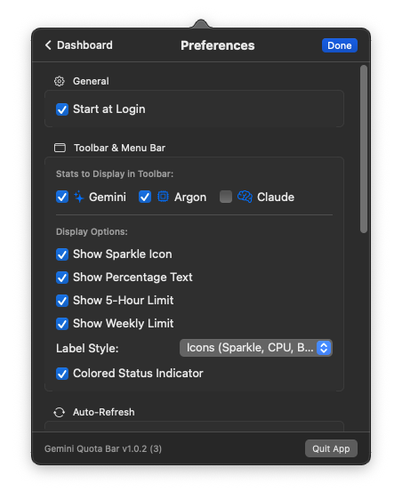
This is an early version of the app, but I’ve tried to make it as configurable as possible. You can choose to display stats for Gemini, Argon and Claude quotas, or any combination of them. You can also configure what’s displayed in the titlebar so it can be as detailed or minimal as you like.
Any feature requests, suggestions or general feedback is welcome. You can leave a comment below or contact us privately.
Screenshots
Download
If you are interested in trying the app, you can download it below:
Sha256: 06d05b65e92cf289d08e2b8a764c659c51e0ea52d73a8f54cb375f7d7a9a0526
Release Notes
[1.0.3] – 2026-11-06
Added
- Gemini Subscription Status (Pro & Ultra): Added detection and display of the user’s active Gemini subscription tier (
Pro,Ultra, orFree) queried directly from the local Antigravity Language Server.- Popover Header Pill Badge: Added a compact, tinted capsule badge (
PRO/ULTRA) beside the “Gemini Quotas” title in the dashboard header bar. - Account & Subscription in Preferences: Added a dedicated “Account & Subscription” section at the top of Preferences displaying the connected user’s name, email, subscription tier badge (
Google AI Pro/Google AI Ultra), and available prompt credits. - Diagnostics & Tooltip Integration: Appended account email and subscription plan status to copied system diagnostics and email support reports, as well as the menu bar item tooltip.
- Popover Header Pill Badge: Added a compact, tinted capsule badge (
- Antigravity 2.0 Desktop App Fallback Discovery: Added native process discovery fallback for the Antigravity 2.0 standalone desktop application when file descriptors in
~/.gemini/antigravity/daemonare absent. Detects running Antigravity 2.0 language server processes, extracts CSRF authentication tokens, queries bound local HTTPS listening ports vialsof, and securely connects via a specialized localhost SSL authentication delegate for self-signed certificates. Added daemon source reporting ("Antigravity 2.0"vs"Antigravity IDE") in both the Diagnostics UI and copied diagnostics report. - Titlebar Status Color Hue Preference: Added a preference under Menu Bar display options in Settings to select between three distinct hue styles for the status indicators in the titlebar text: Light Hues (soft, pastel green, orange, and red suited for dark menu bars/desktops), Standard Hues (standard dynamic emerald green, system orange, and system red), and Darker Hues (deep forest green, dark amber, and crimson red suited for light menu bars/desktops). This hue preference applies strictly to the status indicators in the titlebar text without affecting the popover quota cards. Includes an interactive live color preview in Settings and status hue inclusion in copied diagnostics.
[1.0.2] – 2026-11-04
Added
- Configurable Toolbar Stats (Gemini, Argon, Claude): Added options in Preferences to choose which model stats appear in the macOS menu bar/toolbar (Gemini, Argon, Claude). Users can select any combination (one, two, all three, or none). Added a customizable Label Style setting supporting concise letters (
G:,A:,C:), visual icons (sparklesfor Gemini,cpufor Argon, andbrainfor Claude), or short names (Gem:,Arg:,Cla:). - Start at Login: Users can enable or disable launching Gemini Quota automatically at login from the new “General” section in Preferences. Includes status detection, automatic approval guidance if disabled in System Settings, and reports launch-at-login status in diagnostics.
[1.0.1] – 2026-11-03
Added
- Contact Support Button: Added a “Contact Support” button in Preferences under a new “Support & Feedback” section. Clicking launches the user’s default email client pre-addressed to support email with subject
Gemini Quota Barand diagnostic details pre-filled (App version & build number, macOS operating system version, connection status, daemon PID/port/version, and recent error messages). - Daemon Diagnostics Last Update Time: Added “Last Update” timestamp row to the Antigravity Daemon Diagnostics section in Preferences and included it consistently in copied diagnostics for debugging and troubleshooting purposes.
- Enriched Diagnostics: Enhanced “Copy Diagnostics” and support report to include full macOS operating system version, connection status, and error details.
- App Version in Settings: Updated Settings view footer to dynamically read and display the exact app version and build number. Included in diagnostics copy.
- Adaptive Healthy Green: Updated green status for better accessibility. Applied across quota bucket progress bars, percentage badges, menu bar text, and status indicator dots.
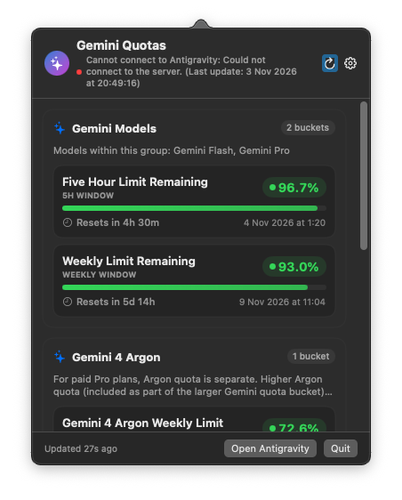
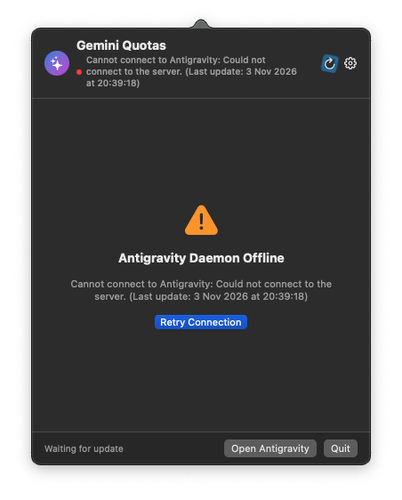
- Error Timestamp Display: Updated error handling and discovery services to display the date and time when the last update occurred in connection and offline error messages.
- Refresh Icon Animation: Fixed the refresh button in the popover header so it performs a full, smooth 360-degree rotation when clicked instead of barely moving.
- Argon Model Group Icon: Fixed icon detection in
QuotaGroup.iconNameby prioritizing the"argon"keyword before"gemini". Previously, groups like"Gemini 4 Argon"matched the"gemini"prefix first and incorrectly defaulted to the"sparkles"symbol instead of the intended"cpu"icon.
[1.0.0] – 2026-11-03
- Initial release of Gemini Quota macOS menu bar application.
- Real-time quota tracking for Antigravity Language Server daemon.
- Menu bar visual indicators with customizable display modes.
- Low quota threshold notifications and daemon auto-discovery.