
Posting a comment with a photo attached has been around for a while on Facebook, but I seen any code examples explaining the process. As a result, I’ve created this brief tutorial to show how simple the API calls are. You can use the API to not only upload a new photo to a comment, but also link to existing photos uploaded elsewhere.
If you’re planning to comment on the user’s behalf, be sure to log them into the application first with publish_stream or publish_actions permission – this will allow you to comment for the user using the API. If you are planning to comment using a page, be sure to get the correct access_token for that page using the manage_pages permission.
Adding a Comment with Existing Photo
The easiest way to add a comment with a photo is to reference an existing image that’s already been uploaded, either to Facebook or elsewhere. The following code sets the basics of adding a comment with a simple message and an existing image from another website:
| <?php | |
| include "facebook/facebook.php"; | |
| $facebook = new Facebook( array( 'appId' => APP_ID, 'secret' => APP_SECRET ) ); | |
| // enable upload support | |
| $facebook->setFileUploadSupport( true ); | |
| // set access token for user / page here (not needed if you intend to use the login flow beforehand) | |
| $facebook->setAccessToken( ACCESS_TOKEN ); | |
| // object you want to comment on (can be status update, photo, link etc) | |
| $object_id = '60506094_10100351413616696'; | |
| $comment_with_url = $facebook->api( $object_id . "/comments", "POST", array( | |
| 'attachment_url' => 'http://healthhub.co/wp-content/uploads/2014/02/Group-Slider.jpg', | |
| 'message' => "Join the team!" | |
| ) ); | |
| // will return id of comment on success | |
| print_r( $comment_with_url ); |
The $facebook->setAccessToken( ACCESS_TOKEN ); line is not needed if you’re planning on logging the user in beforehand. However, you can replace the ACCESS_TOKEN with a valid access_token for testing purposes.
Adding a Comment and Uploading a Photo
If you prefer to upload a photo instead of linking to an existing one, that’s possible too. But a small change in the code is required – instead of using the attachment_url parameter, you must use the source parameter. You can even choose to not leave a message at all, and just comment with a photo – just leave out the message parameter.
The below code demonstrates how to upload a photo as a comment with no message:
| <?php | |
| // following on from: https://gist.github.com/niraj-shah/9780965 | |
| $photo_comment = $facebook->api( $object_id . "/comments", "POST", array( | |
| // local image used, prefixed with @ sign | |
| 'source' => '@meme.jpg' | |
| // no message | |
| ) ); | |
| // will return id of comment on success | |
| print_r( $photo_comment ); |
If you use the source parameter, remember to prefix the path with @ so it’s uploaded correctly to Facebook. Missing out the @ will cause a API error or post your comment with just the message.
The Result
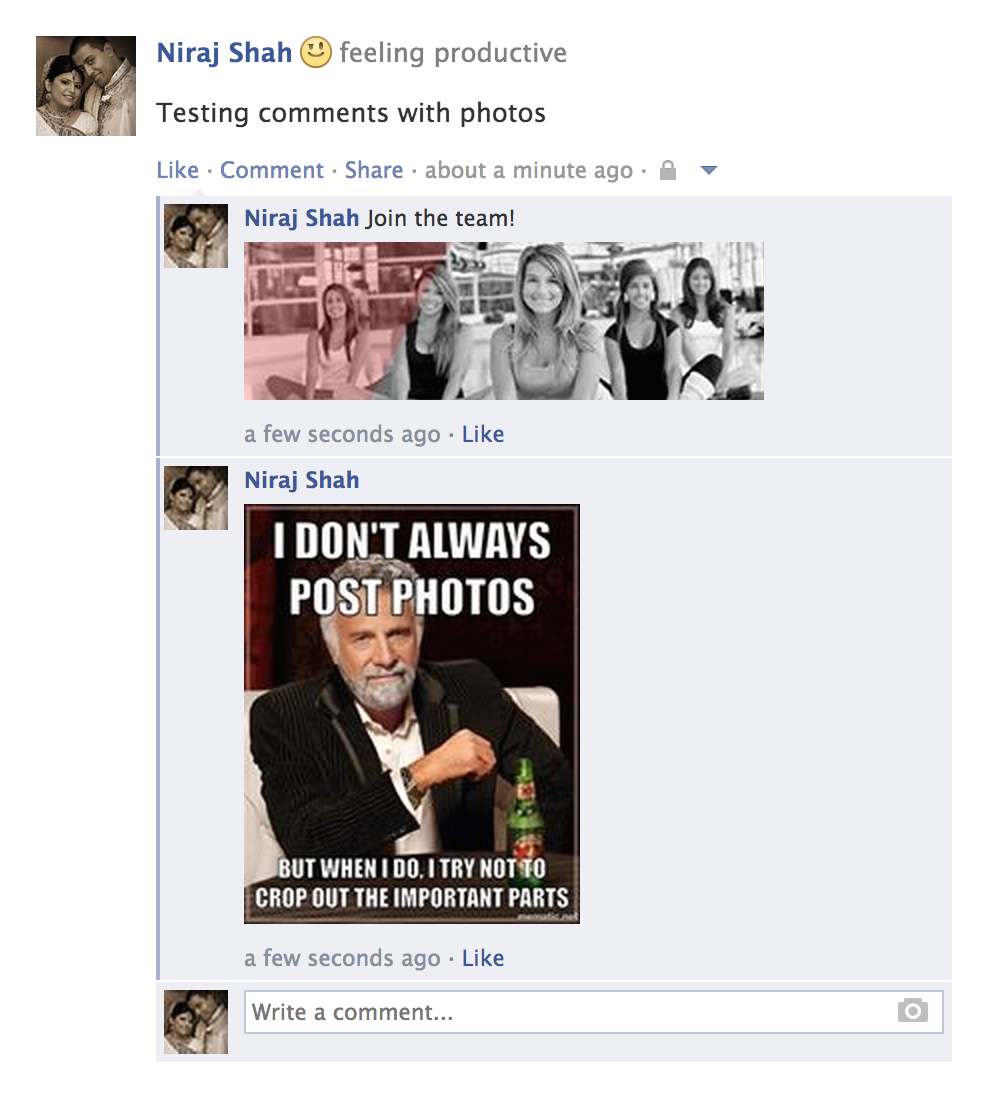
The below screenshot demonstrates the result of the two API calls above. The first comment has a message and an image from an external location, while the second comment only has the meme.jpg image attached.



how about tagging friend on comments ?
You can only tag pages in comments. See the Publishing section on the Facebook Comment Documentation. You can use the
@[page-id]syntax to tag a page.my photo comment is shown in my activity log, not wallpaper. how can photo comment appear in my wallpaper? i used photo path(source).
i am using a second one. so i can leave a photo comment. but it just appear in activity log. not wallpaper. how can i see the photo comment in wallpaper?
What do you mean by “wallpaper”? If you mean “cover photo”, I don’t think you can leave comments on cover photos.
I mean timeline(newspeed also.). i can see photo comment using second code in my activity log. not timeline.
i have a error.
uncaught oauthexception(#100) invalid fbid. thrown in base_facebook.php.
i was searching a long time but i don’t know that’s solution.
do you know about this error?
Using
base_facebook.phpsuggests you are using a really old version of the Facebook PHP SDK. Please upgrade to a newer version. Also, the variablefbidisn’t used in my code so I don’t know where you got that from.thank you so much for your reply. i fixed that error. but i have a other problem. i can’t not upload the photo comment in my wall. i can upload the photo comment in my activity log only. how can i fix this problem?
Comments don’t usually appear on your “timeline” (or wall). They appear in your Activity Log (like if you made a comment yourself and not using the API), and on friend’s “Timeline”. This is the correct behaviour and not a bug or error.