
Geolocating a user using their browser (if supported) is quite easy using HTML5 and JavaScript / jQuery. In fact, it can be done in under 50 lines of code. I wrote up this quick and easy tutorial to help anyone wanting to use geolocation within a browser.
If your browser supports geolocation, the below code will give you a simple static Google Maps image showing your location:
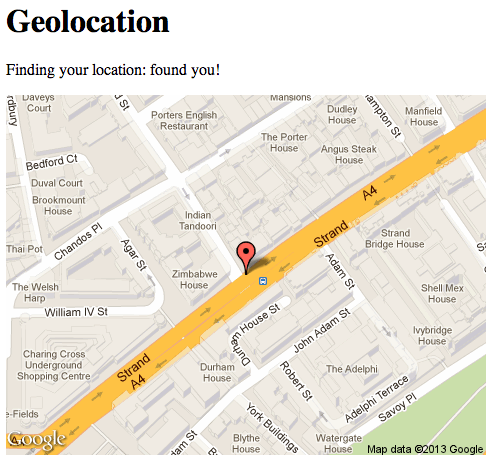
The key to the entire tutorial is the below code. It’s what gets the browser to locate the user:
| if (navigator.geolocation) { | |
| navigator.geolocation.getCurrentPosition(success, error); | |
| } else { | |
| error('not supported'); | |
| } |
In Chrome, the browser will prompt the user to allow permission to access their location:

The HTML:
| <div id="wrapper"> | |
| <!-- Page heading --> | |
| <h1>Geolocation</h1> | |
| <!-- Status --> | |
| <p>Finding your location: <span id="status">checking...</span></p> | |
| </div> |
The JavaScript:
| function success(position) { | |
| // variable to store the coordinates | |
| var location = position.coords.latitude + ',' + position.coords.longitude; | |
| // select the span with id status | |
| var s = $('#status'); | |
| // update the status message | |
| s.html('found you!'); | |
| // Google Maps image using location | |
| $('#wrapper').append('<img src="http://maps.google.com/maps/api/staticmap?center='+ location + | |
| '&zoom=17&markers=size:medium|color:red|'+ location + | |
| '&path=color:0x0000FF80|weight:2|'+ location + | |
| '&size=480x360&sensor=false" />'); | |
| } | |
| function error(msg) { | |
| // select the span with id status | |
| var s = $('#status'); | |
| // set the error message | |
| s.html(typeof msg == 'string' ? msg : "failed"); | |
| } | |
| if (navigator.geolocation) { | |
| navigator.geolocation.getCurrentPosition(success, error); | |
| } else { | |
| error('not supported'); | |
| } |
Demo:
View a working demo of the this on jsbin. This is an exact copy of the code used above, and you can use jsbin to make clone of the code so you can edit it at your leisure. The code has been tested on Chrome, Firefox and Safari (on a Mac, make sure Location Services is enabled from System Preferences > Security & Privacy > Privacy tab).



This doesn’t work. What did you see this work on? I haven’t found one that works at all yet. I’ve been checking high and low.
What browser did you test on? This example works on iOS, Android, Chrome, Safari and Firefox. Try out the code here: http://jsbin.com/egarin/latest
You need to make sure you are including the jQuery library too. If you got any JavaScript errors, please post them here so I can take a look.